[1.2.2] Sound sampling & quality
How Computers Represent Sound
When you listen to music on your phone, watch a video online, or make a voice call, you are experiencing digital sound - sound that has been converted from continuous waves into discrete binary data. Unlike naturally occurring sound, which exists as smooth, continuous vibrations in the air, computers can only process discrete values represented as 0s and 1s. This fundamental difference creates an important challenge: how can we capture the richness and complexity of natural sound using only binary data?
Understanding how computers represent sound is essential for anyone working with digital media, from musicians and sound engineers to app developers and content creators. The quality of sound recordings, the size of audio files, and the performance of audio applications all depend on the principles of digital sound representation. These principles govern everything from the music you stream to the voice assistants you use daily.
Analogue vs Digital Sound

Analogue Sound Waves
Analogue sound is the natural form of sound as it exists in the physical world. Sound is created by vibrations that travel through air as continuous pressure waves. When someone speaks, plays an instrument, or makes any noise, they create vibrations that push air molecules, creating areas of high and low pressure that propagate outward. These pressure waves reach your ear, causing your eardrum to vibrate, which your brain interprets as sound.
The key characteristic of analogue sound is that it is continuous. At any given moment, the sound wave has a specific amplitude (volume) that can take any value within a range. The wave flows smoothly from one value to another without jumps or breaks. If you could zoom in infinitely on an analogue sound wave, you would always see smooth transitions - there are no steps or gaps in the wave.
The Need for Digital Representation
Computers cannot directly process continuous analogue signals. Digital computers work with discrete binary values - sequences of 0s and 1s that represent specific numbers. To store, process, and transmit sound using computers, we must convert the continuous analogue wave into a series of discrete numbers. This process is called digitisation or analogue-to-digital conversion (ADC).
Digital representation offers significant advantages over analogue sound. Digital audio does not degrade with copying or storage - the millionth copy of a digital file is identical to the original. Digital audio can be easily edited, processed with effects, transmitted over networks without quality loss, and stored efficiently. These benefits explain why digital audio has become dominant in music production, telecommunications, broadcasting, and multimedia applications.
The Sampling Process
What is Sampling?
Sampling is the process of measuring the amplitude (height) of an analogue sound wave at regular intervals and recording these measurements as discrete numbers. Imagine taking a photograph of a moving object every second - each photo captures the object's position at that instant, but you lose information about what happened between photos. Similarly, sampling captures the sound wave's amplitude at specific moments in time, creating a series of snapshots of the continuously changing wave.
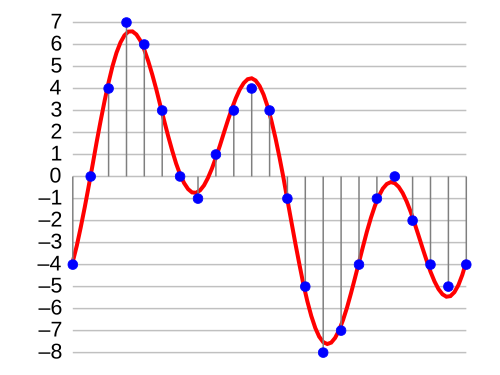
When recording sound digitally, a microphone converts sound pressure into an electrical signal (analogue), which is then passed to an analogue-to-digital converter (ADC). The ADC performs sampling by measuring the voltage of the signal thousands of times per second and converting each measurement into a binary number. These numbers are stored in sequence, creating a digital representation of the original sound.
Key Sampling Parameters
Two critical parameters determine the quality and characteristics of digitised sound:
- Sample rate (also called sampling frequency): How many times per second the amplitude is measured
- Sample resolution (also called bit depth): How precisely each amplitude measurement is recorded
These two parameters work together to determine both the quality of the digital audio and the size of the resulting file. Understanding how they affect sound quality and file size is essential for making informed decisions about audio recording and compression.
Sample Rate (Sampling Frequency)
Definition and Measurement
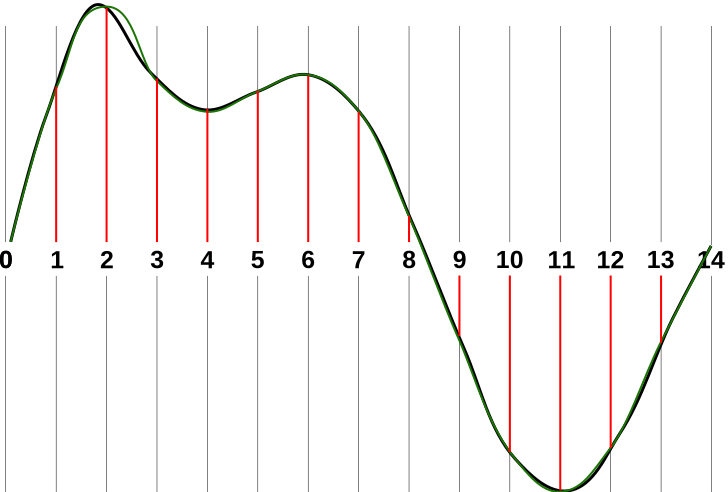
Sample rate is the number of samples (amplitude measurements) taken per second during digitisation. Sample rate is measured in Hertz (Hz), which means cycles per second. For example, a sample rate of 44,100 Hz means the ADC measures the sound wave's amplitude 44,100 times every second.
Common sample rates include:
- 8,000 Hz: Telephone quality - sufficient for speech but poor for music
- 22,050 Hz: AM radio quality - acceptable for voice and basic audio
- 44,100 Hz: CD quality - standard for music, chosen for high-fidelity audio
- 48,000 Hz: Professional audio and video - commonly used in film and broadcasting
- 96,000 Hz or 192,000 Hz: High-resolution audio - used in professional music production
Effects of Sample Rate on Audio Quality
Higher sample rates:
- Capture higher frequencies: A higher sample rate allows faithful reproduction of higher-pitched sounds
- More accurate representation: More frequent sampling captures rapid changes in the waveform more precisely
- Smoother playback: The reconstructed sound wave more closely matches the original analogue wave
- Reduced aliasing: Less risk of frequency distortion
Lower sample rates:
- Miss high frequencies: Sounds above half the sample rate cannot be accurately captured
- Less detail: Rapid changes in amplitude may not be captured accurately
- Potential aliasing: High frequencies may create distortion artifacts
- Acceptable for limited applications: Speech and simple audio may sound adequate
Effects of Sample Rate on File Size
Sample rate directly affects file size because more samples mean more data to store. If you double the sample rate, you double the number of samples stored, which approximately doubles the file size (assuming the same sample resolution). For example:
- A one-second audio clip at 22,050 Hz contains 22,050 samples
- The same clip at 44,100 Hz contains 44,100 samples - twice as many
- The 44,100 Hz version requires approximately twice the storage space
This trade-off between quality and file size is crucial when deciding on appropriate sample rates for different applications. Streaming music services must balance audio quality against bandwidth requirements, while professional music producers prioritise quality over file size.
Sample Resolution (Bit Depth)
Definition and Measurement
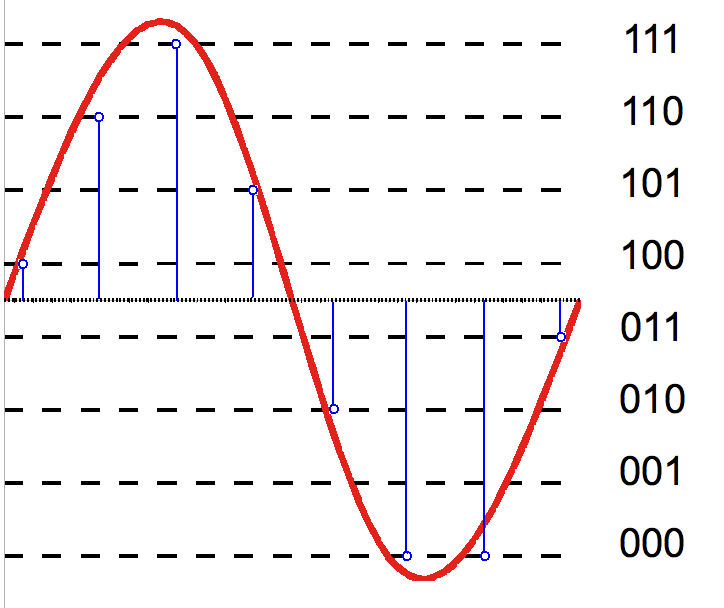
Sample resolution, also called bit depth, determines how precisely each sample's amplitude is measured and stored. It specifies the number of bits used to represent each sample. More bits allow for more possible amplitude values, providing greater precision in representing the sound wave's height at each sampling moment.
Common bit depths include:
- 8-bit: 28 = 256 possible amplitude levels - very low quality, suitable only for basic sound effects
- 16-bit: 216 = 65,536 possible amplitude levels - CD quality, standard for consumer audio
- 24-bit: 224 = 16,777,216 possible amplitude levels - professional studio quality
- 32-bit: 232 = over 4 billion possible amplitude levels - used in professional audio processing
Understanding Amplitude Levels
Each bit depth creates a specific number of "steps" or levels for measuring amplitude. Think of it like a ruler - an 8-bit system is like a ruler with only 256 marks, whilst a 16-bit system has 65,536 marks, allowing much finer measurements. When a sound wave's actual amplitude falls between two available levels, it must be rounded to the nearest available level, introducing small errors called quantisation error.
For example, with 8-bit resolution:
- Each sample can be represented by values from
00000000to11111111(0 to 255 in decimal) - The amplitude must be rounded to one of these 256 levels
- If the actual amplitude is 17.6 on a 0-255 scale, it might be stored as 18, losing the 0.6
- These rounding errors accumulate, creating a form of noise called quantisation noise
Effects of Sample Resolution on Audio Quality
Higher bit depth:
- Greater dynamic range: Ability to represent both very quiet and very loud sounds in the same recording
- Lower quantisation noise: More precise amplitude measurements reduce rounding errors
- Better signal-to-noise ratio: The ratio of useful sound to background noise improves
- More detail in quiet passages: Subtle sounds are represented more accurately
- Professional quality: Essential for recording, editing, and mastering audio
Lower bit depth:
- Limited dynamic range: Difficulty representing both quiet and loud sounds well
- Audible quantisation noise: Rounding errors create a "grainy" or "harsh" quality
- Poor quality in quiet sections: Soft sounds may be lost or distorted
- Acceptable for basic audio: Simple sounds or voice may be adequate at lower bit depths
Effects of Sample Resolution on File Size
Bit depth directly affects file size because more bits per sample means more data to store. If you double the bit depth, you double the file size (assuming the same sample rate). For example:
- Each 8-bit sample requires 1 byte of storage
- Each 16-bit sample requires 2 bytes of storage
- Each 24-bit sample requires 3 bytes of storage
- A 60-second mono recording at 44,100 Hz with 16-bit depth: 44,100 samples/sec × 2 bytes × 60 sec = 5,292,000 bytes ≈ 5.05 MB
Calculating Digital Audio File Sizes
The Formula
The size of an uncompressed digital audio file can be calculated using:
File size (bytes) = Sample rate × Bit depth ÷ 8 × Duration × Number of channels
Breaking this down:
- Sample rate: Number of samples per second (Hz)
- Bit depth ÷ 8: Bits per sample converted to bytes per sample
- Duration: Length of audio in seconds
- Number of channels: 1 for mono, 2 for stereo, more for surround sound
Worked Examples
Example 1: CD-quality stereo audio
- Sample rate: 44,100 Hz
- Bit depth: 16 bits (2 bytes)
- Duration: 3 minutes (180 seconds)
- Channels: 2 (stereo)
- Calculation: 44,100 × 2 × 180 × 2 = 31,752,000 bytes ≈ 30.3 MB
Example 2: Telephone-quality mono audio
- Sample rate: 8,000 Hz
- Bit depth: 8 bits (1 byte)
- Duration: 1 minute (60 seconds)
- Channels: 1 (mono)
- Calculation: 8,000 × 1 × 60 × 1 = 480,000 bytes ≈ 0.46 MB
Example 3: High-resolution audio
- Sample rate: 96,000 Hz
- Bit depth: 24 bits (3 bytes)
- Duration: 4 minutes (240 seconds)
- Channels: 2 (stereo)
- Calculation: 96,000 × 3 × 240 × 2 = 138,240,000 bytes ≈ 131.8 MB
Trade-offs in Digital Audio
Quality vs File Size
There is an inherent trade-off between audio quality and file size. Higher sample rates and greater bit depths produce better quality audio but result in larger files. This creates practical challenges for storage and transmission. A three-minute song at CD quality requires about 30 MB uncompressed, whilst the same song at telephone quality might require only 1.4 MB.
Different applications require different balances:
| Application | Typical Settings | Priority |
|---|---|---|
| Professional music recording | 96,000 Hz or higher, 24-bit | Maximum quality for editing |
| CD audio | 44,100 Hz, 16-bit | Balance quality and storage |
| Streaming music | 44,100 Hz, 16-bit (compressed) | Good quality with manageable bandwidth |
| Voice calls | 8,000-16,000 Hz, 8-16 bit | Minimal bandwidth, speech clarity |
| Audiobooks | 22,050 Hz, 16-bit (compressed) | Speech clarity, small files |
Compression
To reduce file sizes whilst maintaining acceptable quality, audio compression is commonly used. Compression algorithms like MP3, AAC, and Opus can reduce file sizes by 80-90% by removing sounds humans cannot hear well and encoding the remaining data more efficiently. However, this topic goes beyond the scope of basic sampling and resolution - the key point is that the raw calculations based on sample rate and bit depth represent uncompressed file sizes.
Real-World Applications
Music Production and Distribution
Professional music producers typically record at 96,000 Hz or 192,000 Hz with 24-bit or 32-bit depth to capture maximum detail and dynamic range during recording and editing. This high quality provides headroom for processing effects and mixing without degradation. The final master is then converted to CD quality (44,100 Hz, 16-bit) for distribution or compressed to formats like MP3 or AAC for streaming services.
Telecommunications
Phone calls use relatively low sample rates (8,000 Hz) because they only need to transmit speech clearly, not music. The limited bandwidth of mobile networks makes high-quality audio impractical for voice calls. Modern voice-over-IP services may use slightly higher rates (16,000 Hz) for improved clarity whilst still conserving bandwidth. Video conferencing must balance audio quality against network capacity and processing power, typically using moderate sample rates with efficient compression.
Gaming
Video games must play many sound effects simultaneously whilst maintaining performance, so they often use moderate quality (22,050 Hz or 44,100 Hz, 16-bit) to balance quality, file size, and processing requirements. Music in games may use higher quality, whilst sound effects may use lower quality. The total storage and processing budget must be shared between graphics, audio, and game logic, creating complex trade-offs.
Voice Assistants and Speech Recognition
Voice assistants like Siri, Alexa, and Google Assistant must capture speech clearly enough for recognition algorithms whilst minimising bandwidth for cloud processing. They typically use 16,000 Hz sampling, which captures speech frequencies well without requiring excessive data transmission. The audio is often processed locally before sending smaller amounts of data to cloud servers for interpretation.
Key Takeaways
- Computers represent sound by sampling analogue sound waves at regular intervals, converting continuous waves into discrete digital values stored as binary data
- Sample rate (measured in Hz) determines how many times per second the sound wave is measured; higher sample rates capture more detail and higher frequencies, with CD quality using 44,100 Hz
- The Nyquist theorem states that the sample rate must be at least twice the highest frequency you want to capture; 44,100 Hz exceeds twice the 20,000 Hz limit of human hearing
- Sample resolution (bit depth) determines how precisely each sample's amplitude is measured; higher bit depths like 16-bit provide greater dynamic range and lower quantisation noise than 8-bit
- Both sample rate and bit depth directly affect file size: doubling either parameter approximately doubles the file size, creating a trade-off between quality and storage requirements
- File size calculation: Sample rate × (Bit depth ÷ 8) × Duration × Number of channels, allowing prediction of storage needs for different audio quality settings